List your surfboards & gear in minutes
Snap a few photos, add the details, set your price, it’s that simple. Your board stays with you until pickup, and you’re in full control from start to finish.

Less spam, more real surfers, sell safer and faster
Junkyard Surf makes buying and selling surfboards simple, safe, and local. Instead of scrolling through endless spam on Facebook or Gumtree, you get a surf-only marketplace with filters that matter. Surfboard shape, dimensions, fin setup, condition, and more.
The app is built to back the surf community, not replace it. For shops, it’s your digital shopfront—your boards reach more people online, while surfers still come into your store to check them out, get them under their arm, and buy in person. For surfers, it’s a trusted place to sell from your own quiver and find your next board from locals and shops you know.
With surf-specific categories, a surf-first community, and secure payments through Stripe, Junkyard Surf cuts through the noise to connect the right boards with the right surfers.
You stay in control, your stock, your pricing, your sales. We just help more people see what you’ve worked hard to build.
Create your new listing in 3 easy steps
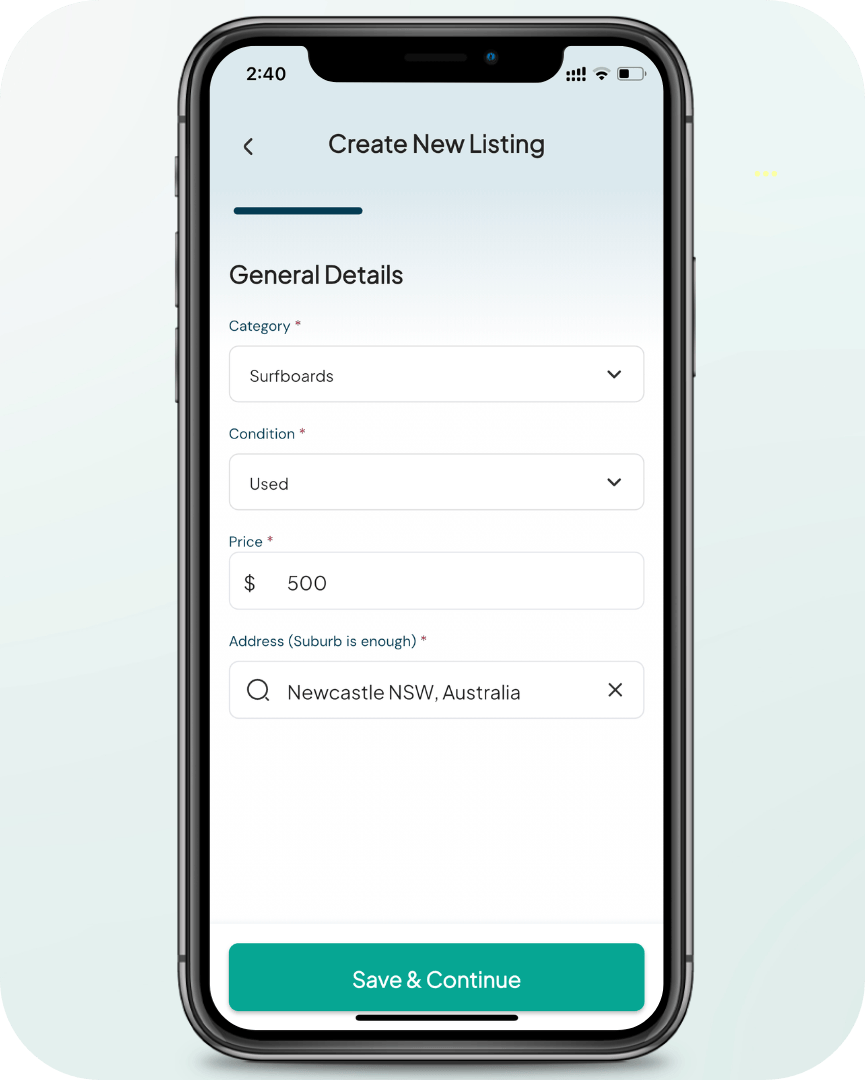
1. Category Selection, New/Used, Price, Location
Categories - includes surfboards, wetsuits, surfboard fins and accessories (each selection has its own set of filters)
New/Used - brand new or pre-loved
Price - set a fair value for you listing
Address - Be specific for your shop front or adjust to suburb level for listing privacy
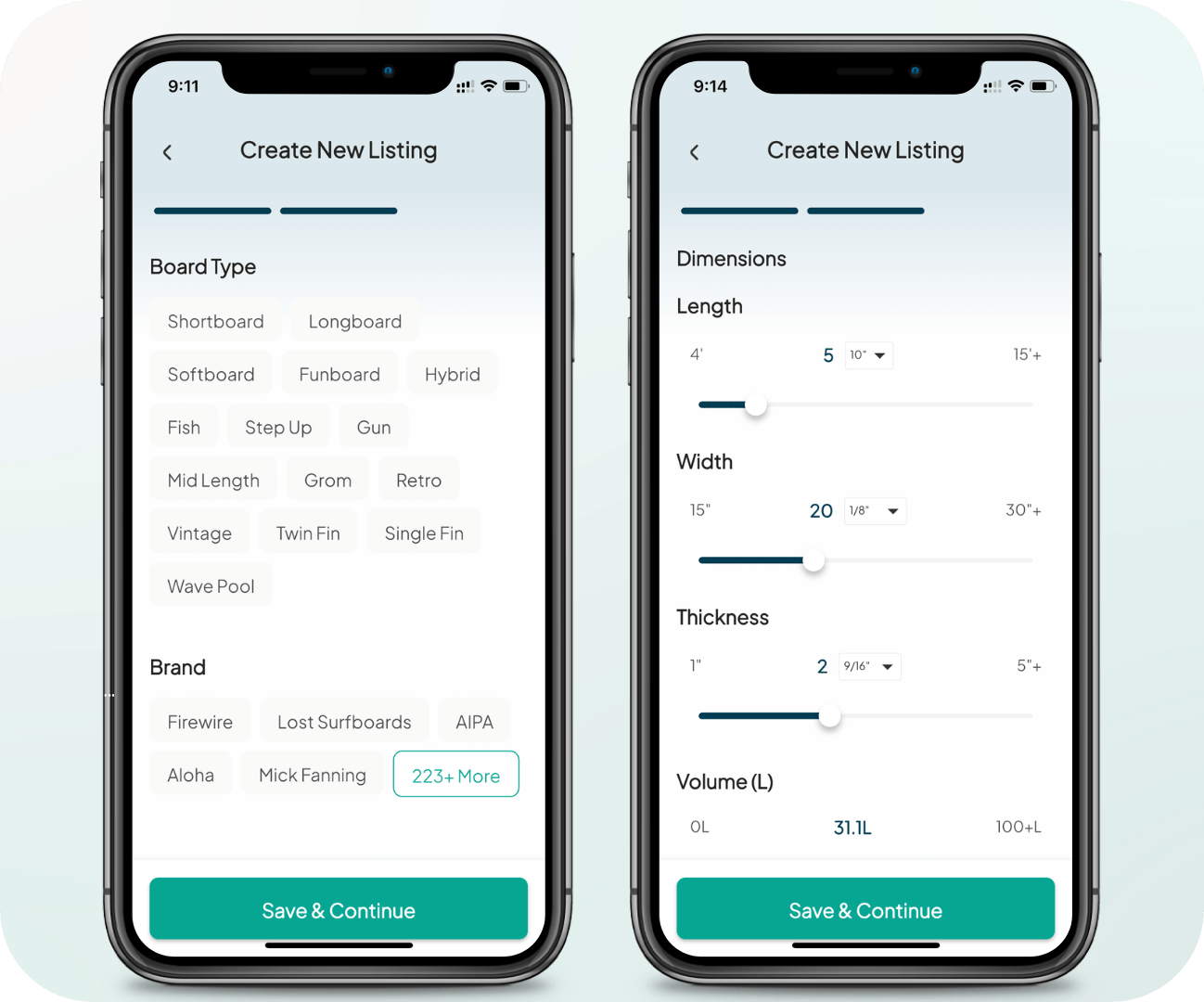
2. Surfboard Specs & Features
Board Type - select the style of board you’re selling (Shortboard, Fish, etc.)
Brand/Model - Shaper/brand and model name.
Length - tip-to-tail measurement of the board
Width - widest point of the board
Thickness - depth of the board from deck to bottom
Volume - total litres of floatation, shown as “L” on most boards
Dimensions are usually written on the deck or bottom of the board.
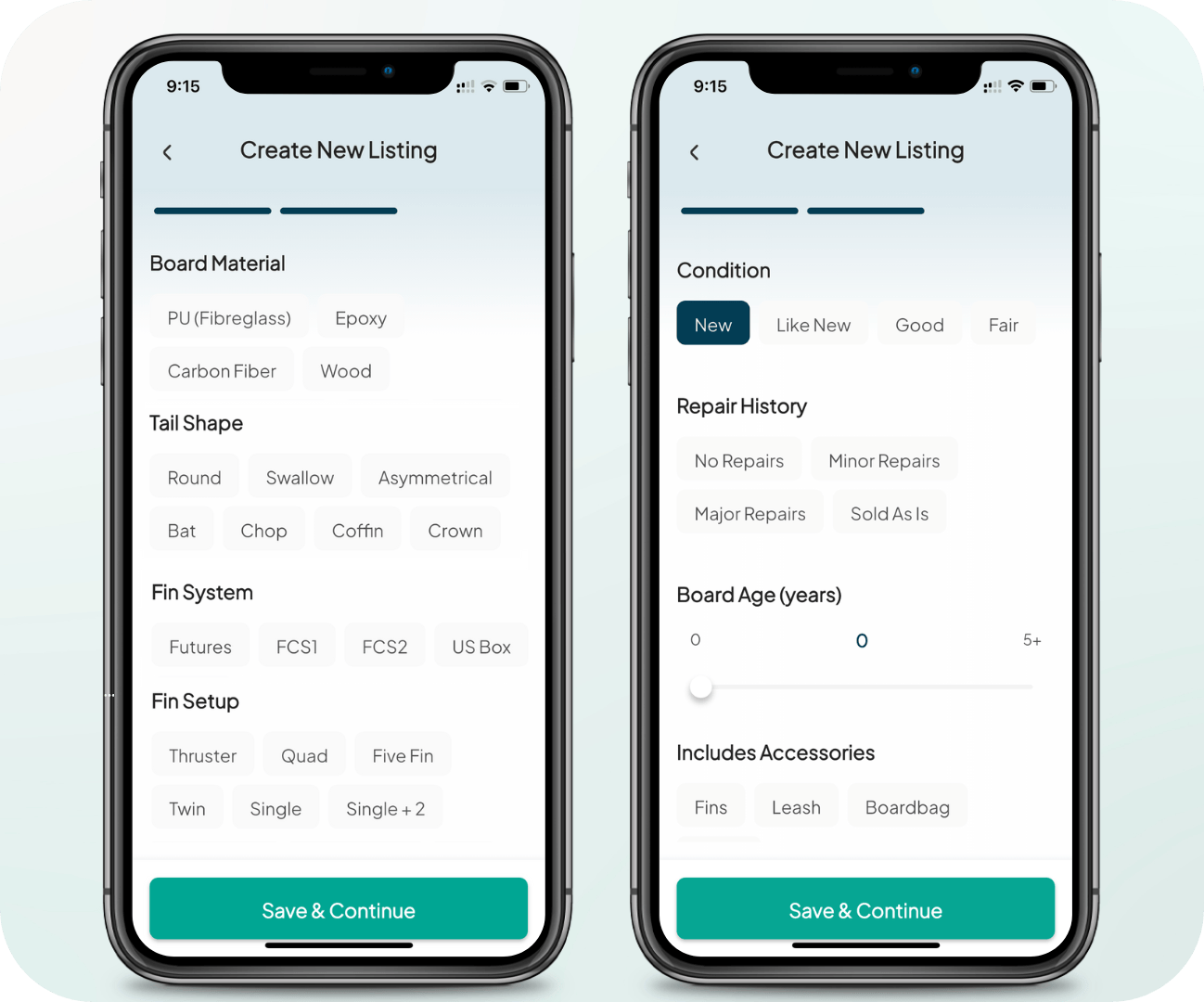
Board Material – Select your board’s construction (PU, Epoxy, etc.).
Tail Shape – Choose the tail shape that matches your board.
Fin System – Note whether it’s FCS, Futures, glassed-in, or other.
Fin Setup – List the setup (Thruster, Twin, Quad, etc.).
Condition – Be upfront about the board’s condition.
Repair History – Let buyers know if it’s ding-free or has repairs.
Board Age – Approximate years since the board was new.
Includes Accessories – Add value with extras like fins, leash, or bag.

3. Add the Final Touches
Upload clear, well-lit photos to make your board stand out.
Show all key angles: top deck, bottom, rails, tail, and fins.
Include close-ups of dimensions written on the board.
Be upfront with photos of any repairs or damage.
Add a title (Brand + Model + Size works best).
Write a short description highlighting condition and extras.
Hit Create Listing and your board goes live instantly.

Price bands by board type & condition
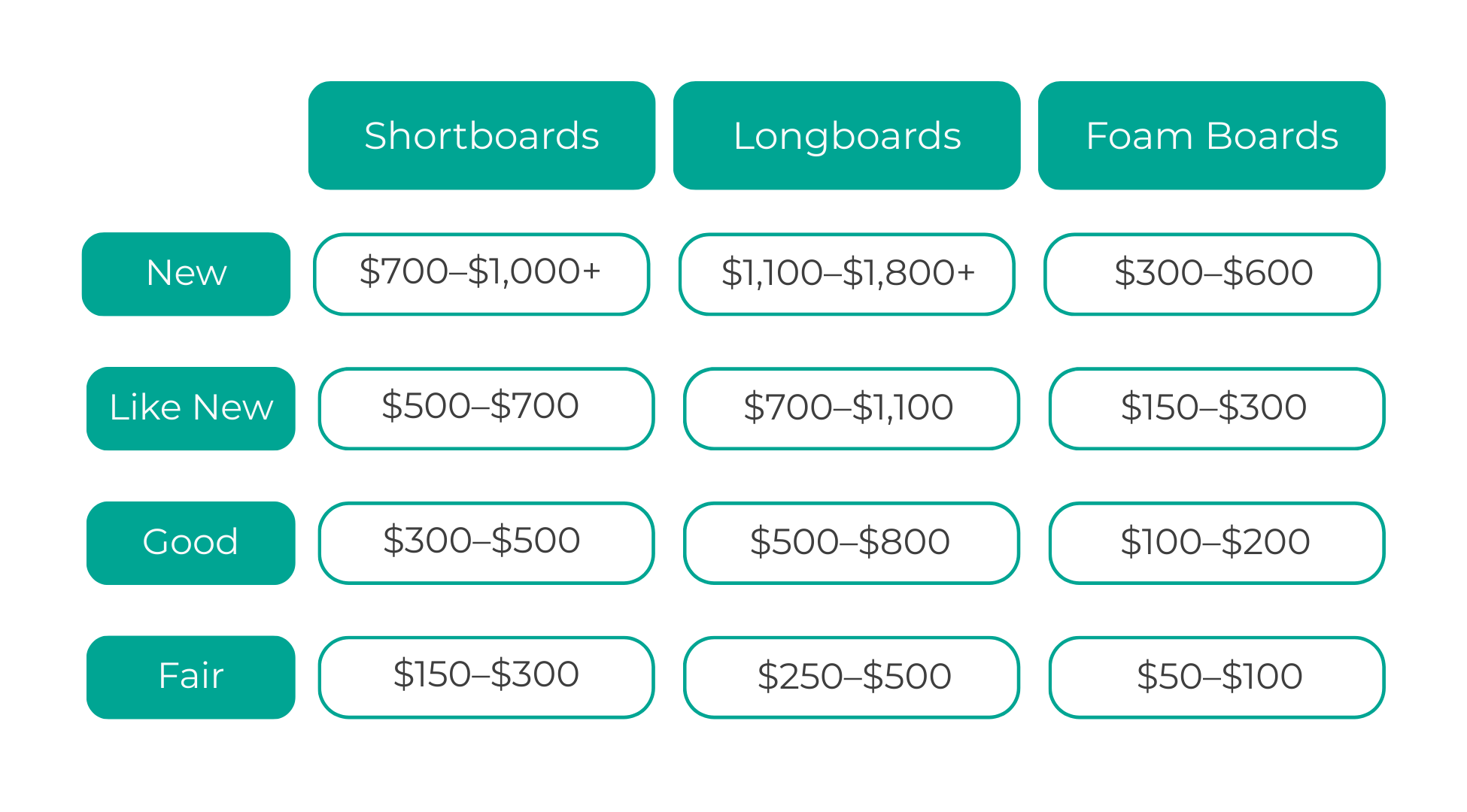
Board values shift with brand, model, age, and demand. Use these ranges as a guide and adjust based on your board’s unique appeal.
Manage Listings, Messages & Offers
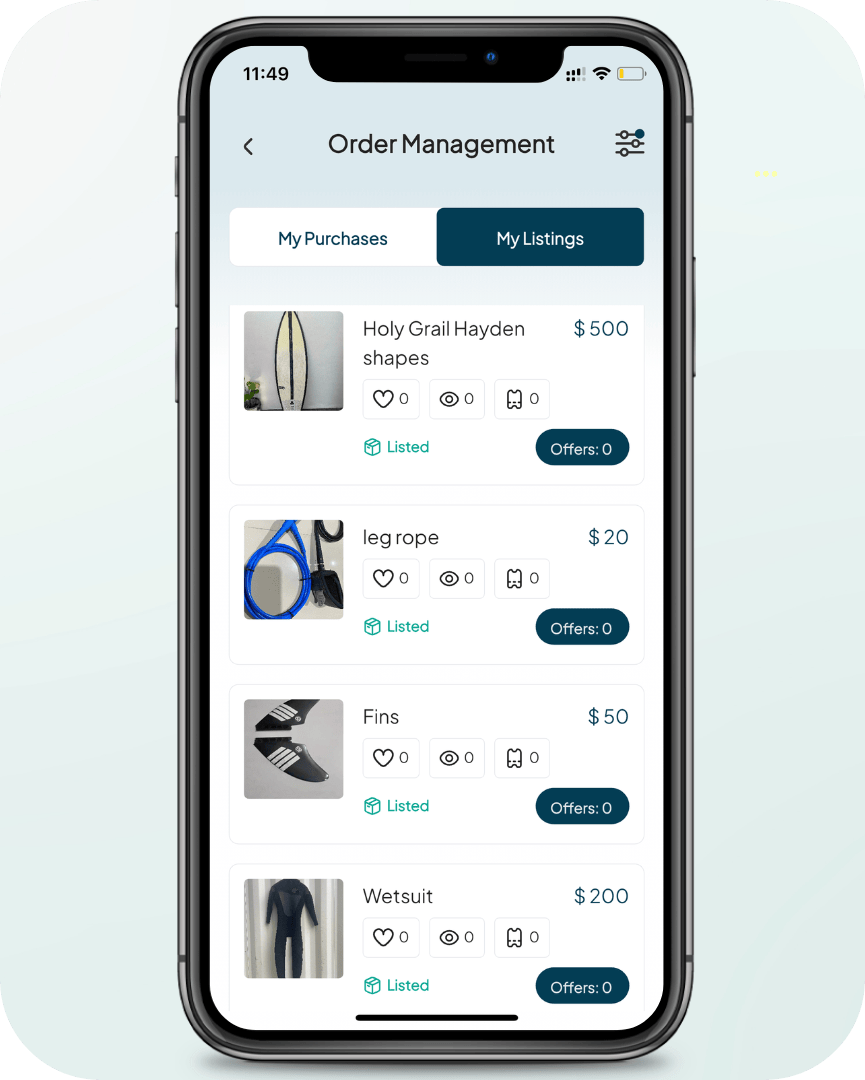
Order Management
Track your listings, manage offers, and keep sales organised with simple built-in tools.
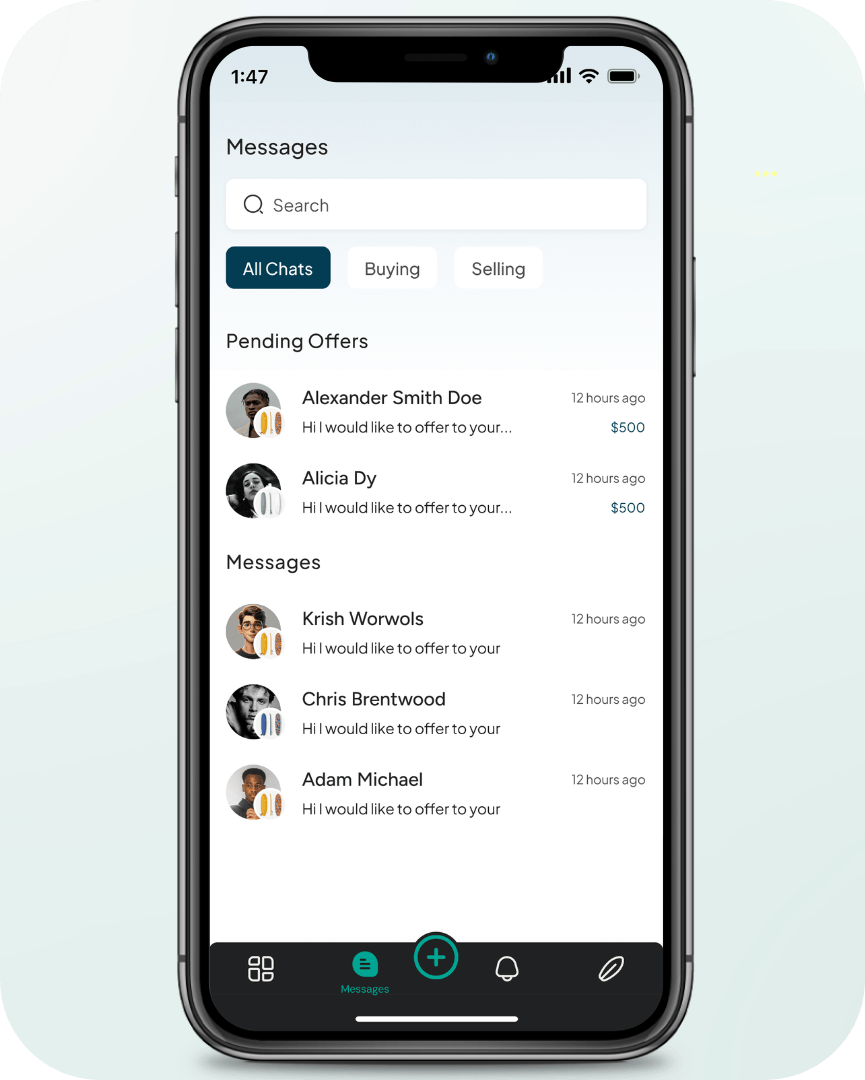
In-App Messaging
Chat directly with buyers, answer questions, and confirm pickup — all in one place.

Receive offers directly through the app. Negotiate a fair price and complete your sale.
Wait for an Offer
How Secure Payouts Work
All payments on Junkyard Surf are handled securely through Stripe, our trusted payment partner. When a buyer checks out using our online payment system, their funds are transferred straight into Stripe so payment is guaranteed from the start. You never share bank details directly, and your money is held safely until pay-out, which is usually released within 2–3 business days.
To receive pay-outs, sellers must complete Stripe’s KYC verification as soon as possible. This can be done in the My Junkyard section of the app, and you’ll also be prompted to complete it after creating your first listing. Verification can take up to 14 days, so it’s best to set this up early, before your first offer to avoid any delays when you make a sale.
Your pay-out is always guaranteed once a buyer completes their purchase.
Selling FAQs
-
Junkyard Surf is Australia’s dedicated surfboard marketplace where surfers can buy and sell new and second hand surfboards locally. The platform connects everyday surfers, local surf shops, shapers, and board repair services in one place. With features like surfboard search filters, secure payments, and local listings, Junkyard Surf makes it easier to find boards near you and support the Australian surf community.
-
To list a surfboard on Junkyard Surf, create a free account, tap Create Listing, and add your board details including type, brand or shaper, dimensions, condition, price, and photos. Choose your location so buyers near you can find it. Listings are live in minutes and you can edit or update them anytime.
-
No. Junkyard Surf is a peer-to-peer surfboard marketplace, which means you keep your board until it is sold. You deal directly with the buyer and arrange pickup or delivery. We do not hold or store boards at any stage.
-
All payments are processed securely through Stripe. When a buyer completes checkout, funds are guaranteed and usually released to your bank within 2–3 business days after pickup.
-
Yes. Sellers must complete Stripe’s KYC verification before they can accept offers. This keeps buyers and sellers safe and builds trust in the marketplace. Verification can take up to 14 days, so we recommend completing it early.
-
You can view the full breakdown of platform and payment fees on our Fees page.
-
Boards from well-known shapers in good condition and priced fairly tend to sell fastest. Popular options include shortboards, twin fins, mid-lengths, and longboards from trusted brands. Listings with accurate dimensions, clear photos, and realistic pricing attract more buyers and move quickly.
-
Absolutely. Shops can use Junkyard Surf as a digital shopfront to showcase their boards to more buyers online while still making sales in-store. It is free to list and a simple way to increase visibility and move stock faster.
-
Yes. Most buyers and sellers on Junkyard Surf meet locally to hand over boards. For safety, we recommend meeting in a public place, checking the board before confirming the sale, and keeping all communication inside the app. If something does not feel right, you can report the user and our team will review it.
-
Download Junkyard Surf Today
Other marketplaces weren’t built for surfers. We are!
Junkyard Surf makes it easy to find the right board, connect with local shops and shapers, and keep boards in the water longer.